
Learning salsa timing involves more than remembering when to move a foot. The harder part is hearing how that movement fits inside the music. Salsa 360, a free interactive tool from Salsa Vida, brings those two sides of practice together: animated dancers demonstrate the basic while a set of instrument controls lets users take the accompanying rhythms apart.
Regular and side basics, viewed from any angle
Salsa 360 now offers both a regular basic and a side basic. Being able to switch between them gives dancers another way to explore the same count, rather than tying their understanding of timing to one forward-and-back pattern.
The animated leader and follower can be viewed from the front, side, overhead, or a closer footwork angle. Users can also drag to orbit the couple, zoom, or enable automatic rotation. Foot paths and colored weight-transfer markers help make the movement readable, while a translucent-dancer option offers another way to inspect positions that might otherwise be obscured.
Adjustable tempo, half-speed playback, spoken counts, and buttons for inspecting individual counts make it possible to slow a confusing moment down. The combination is particularly helpful when a fixed-angle video leaves a learner wondering which foot moved, or where the weight went.
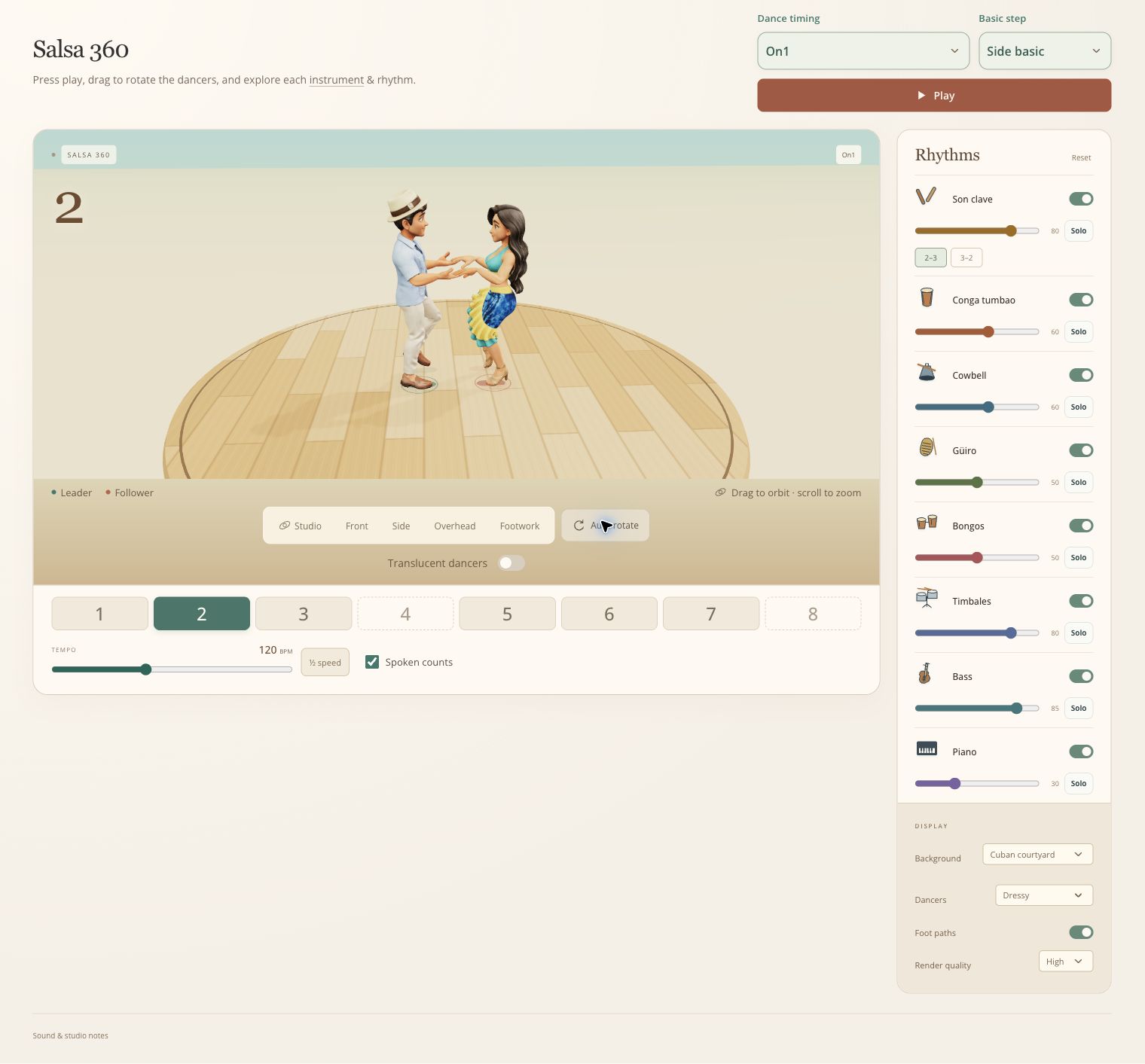
Salsa 360’s current interface, with Side basic selected and the full instrument mixer alongside the dancers.
A rhythm section you can take apart
The instrument mixer is the tool’s most interesting feature. It includes son clave, conga tumbao, cowbell, güiro, bongos, timbales, bass, and piano. Each layer has an on/off switch, a volume slider, and a Solo button, so users can focus on one part or build a mix around the sounds they want to study. The clave also has 2–3 and 3–2 options.
This turns listening into an active exercise. A dancer might start with the conga, watch the basic against its accents, then bring in the bass and piano. Another useful approach is to isolate a less familiar instrument, learn to recognize its repeating pattern, and then hear it again within the fuller arrangement.
The visual count and moving dancers give that listening a reference point. Instead of treating salsa as an undifferentiated wall of percussion, users can explore how several parts occupy the same musical space while the steps continue.
Compare timings and personalize the studio
Dance timing choices include On1, Eddie Torres On2, Tumbao / Power 2, and clave-based On2 variations in both directions. Switching among them makes the tool useful for comparing how the basic relates to different rhythmic reference points.
The presentation has variety, too. You can select from different characters, outfits and backgrounds for your virtual dance studio. These choices give repeated practice some personality.
The verdict
Salsa 360 works best as an interactive practice companion. Its strength is putting steps, counts, and individual instruments within the same experiment, with enough control to revisit a detail at a comfortable pace. It cannot watch a student and correct technique, and its repeating arrangements are a starting point for listening rather than a substitute for dancing to full songs.
For a free browser tool with no account or download required, however, it offers plenty to explore. Beginners can use it to reinforce the basics, while more experienced dancers can investigate timing and listen more closely to the rhythm section. Try Salsa 360 on Salsa Vida.